To search
Softonic Rating:
Very good:8/10
License:
Evaluation
Added:
April 28, 2005
Updated:
June 27, 2008
Publisher:
Website
File size:
9.9 MB
Downloads:
506

“Convert your video and audio files between all popular media formats”

Digital Media Converter makes it easy for you to convert your video and audio files from one format to another. Now you can organize and batch convert all your video and audio files between: VCD, DVD, AVI (DivX, MS MPEG4, uncompressed, etc), MPEG-1, MPEG-2 (PAL, NTSC), MP3, MOV, WMA, WMV, and WAV formats.

Making VCD and DVD format files is simple with Digital Media Converter. You can do even more, such as extracting the audio from the video and saving just the audio tracks. You can use the advanced settings to change the video frame size, audio / video compression codec, frequency, and the number of channels in an audio stream. The program's mass conversion capability lets you multi-select files and add entire folders for conversion.

It gives you complete control over the files that you want to convert. Digital Media Converter uses the Microsoft DirectShow technology and can therefore convert faster than other conventional products. You do not need to be a professional to use this tool. The software provides default settings and auto-select features designed to give you high quality and low size conversions.

Languages:

English

Limitations:

30 day Trial Period Inserts watermark

OS requirements for Digital Media Converter:

  • OS: Win98/98SE/Me/2000/XP

Digital Media Converter Softonic Rating: 8Featured program

Softonic gives special recognition to software of exceptionally high quality. More information

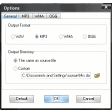
Digital Media Converter options

Digital Media Converter Options

Reviews for Digital Media Converter in other languages

Softonic Rating:Very good
User Rating
Your opinion is important!

Download stats

Related

Related searches
View all

Are you the developer of Digital Media Converter?

If your program has received a Softonic rating, feel free to use the following award badge on your site or as part of any other promotional feature you may be putting together.

Digital Media Converter Softonic Rating

Click on the above text field to copy the necessary HTML to your clipboard and then paste it to your website. It will display your program's Softonic Rating and will link to your program page.

Any queries? Contact us if you want more info.

Close